1
Chapter 2
Installing the SmartSwitch 9000
Module
This module uses TPIMs for the front panel RI/RO connections. They are not
shipped with the module and must be purchased separately. There are
configuration switches on some of the TPIMs. They are described in the
instruction card shipped with the TPIMs. For information on the various TPIMs
models, see Appendix A.
Unpacking the Module
1. Carefully remove the module from the shipping box. (Save the box and
packing materials in the event the module must be reshipped.)
2. Remove the module from the plastic bag. Observe all precautions to prevent
damage from Electrostatic Discharge (ESD).
3. Carefully examine the module, checking for damage. If any damage exists,
DO NOT install the module. Contact Cabletron Systems Technical Support
immediately.
Installing an TPIM
The 9T122-08 MicroLAN module is shipped without TPIMs. To install a TPIM,
follow the procedure below:
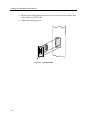
1. Loosen the mounting screw and remove the faceplate from the RI/RO port on
the 9T122-08 or
If replacing a TPIM, loosen the mounting screw and pull the TPIM straight out from
the 9T122-08.
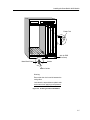
2. Slide the new TPIM into place as shown in Figure 2-1.
2-1