1
Configuring LiveUpdate
Scheduling LiveUpdate via the command line
To schedule LiveUpdate to update virus definitions automatically
1
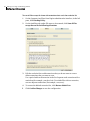
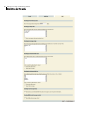
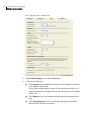
On the Symantec AntiVirus Scan Engine administrative interface, in the left
pane, click LiveUpdate.
2
In the Enable scheduled updates list, select the desired interval.
This setting is Off by default.
3
Click Confirm Changes to save the configuration.
Updating virus definitions manually
When necessary, you can run LiveUpdate manually to force an immediate
update of virus definitions. If you have scheduled LiveUpdate, the next
scheduled LiveUpdate attempt occurs as directed.
To update virus definitions manually
1
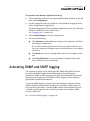
On the Symantec AntiVirus Scan Engine administrative interface, in the left
pane, click LiveUpdate.
2
Click LiveUpdate Now.
The screen refreshes to indicate whether the LiveUpdate was successful. It
may take a few minutes for the screen to refresh.
Scheduling LiveUpdate via the command line
You can also schedule LiveUpdate via the command line to ensure that the
Symantec AntiVirus Scan Engine always has the most current virus definitions.
On Solaris and Linux, virus definitions updates can be scheduled using the UNIX
cron scheduler and a shell script.
The cslive.exe client can be run from the command line to update virus
definitions for the Symantec AntiVirus Scan Engine for Windows 2000 Server/
Server 2003.
133