1
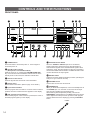
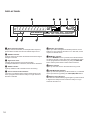
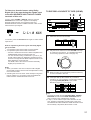
DISPLAY PANEL
1
2
PRESET
3
SLEEP
ms dB STEREO
kHz
MHz
MEMORY AUTO
8
20 40 60
l00
5 6
NORMAL
WIDE
PHANTOM
EFFECT OFF
TAPE MONITOR PRO LOGIC CONCERT MONO DISCO
ENHANCED
7
0
4
9
1 Multi-information display
Displays various information, for example station frequency,
preset station number and name of selected input source.
2 STEREO indicator
Lights up when an FM stereo broadcast with sufficient signal
strength is received.
3 Signal-level meter
Indicates the signal level of the received station.
If multipath interference is detected, the indication decreases.
4 SLEEP indicator
Lights up while the built-in SLEEP timer is functioning.
5 Center channel mode indicators
The name of a selected center channel mode lights up only
when a program which uses the Dolby Pro Logic Surround
decoder is selected.
ROCK CONCERT
VIDEO MOVIE STADIUM CONCERT HALL
0
6 EFFECT OFF indicator
Lights up if neither the digital sound field processor nor the
Dolby Pro Logic Surround decoder is on. In this state, sound
output is 2-channel stereo.
7 MEMORY indicator
When the MEMORY button is pressed, this indicator flashes
for about 5 seconds. During this period, the displayed station
can be programmed to the memory by using the A/B/C/D/E
button and the preset station number selector buttons.
8 AUTO indicator
Lights up when this unit is in the automatic tuning mode.
9 TAPE MONITOR indicator
Lights up when the tape deck (or MD recorder etc.) is selected
as the input source by pressing the TAPE (MD) MON button.
0 DSP program indicators
The name of a selected DSP program lights up when the builtin digital sound field processor and/or the Dolby Pro Logic
Surround decoder is on.
16