1
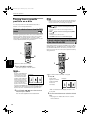
Advanced operations
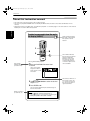
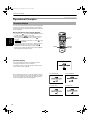
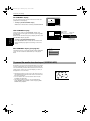
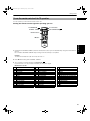
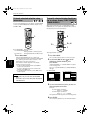
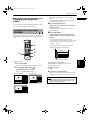
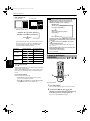
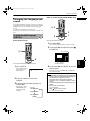
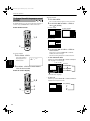
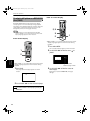
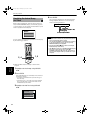
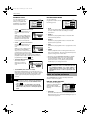
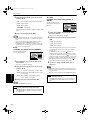
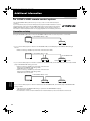
3 Press CURSOR 2/3 to adjust the effect level.
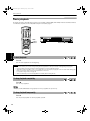
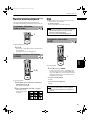
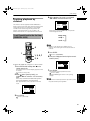
1 Press ON SCREEN.
You can adjust the effect level in 5 steps.
English
The on-screen display appears on the TV screen.
2 Use CURSOR 5/∞ to move
to [TIME
SELECT].
(for Audio CD)
(for DVD AUDIO)
3D PHONIC
THEATER
L
H
GROUP
TRACK
2
23
2:34:58
TIME
MIN
EACH
REMAIN
TRACK 8
TIME
SEC
0 : 58
EACH
TIME SELECT
TIME SELECT
REPEAT
REPEAT
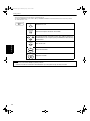
Effect level
Toward L: Reduces the effect.
Toward H: Enhances the effect.
2
3
4
5
6
7
8
9
10
11
12
13
14
15
16
17
18
19
20
21
22
23
24
2
MIN
1
TIME
4
5
6
1
PROGRAM
9
10
11
12
13
14
17
18
19
20
21
22
RANDOM
7
8
TIME SEARCH
15
16
PROGRAM
23
24
RANDOM
2/3
Time display
Time display
(for Video CD)
TRACK
3
TIME SEARCH
AUDIO
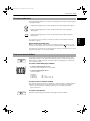
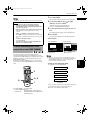
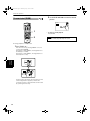
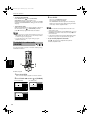
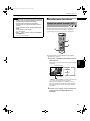
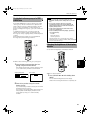
• To turn off the 3D PHONIC screen, press ENTER. The 3D
PHONIC screen disappears if no operations are made for
more than 10 seconds.
A-B REPEAT
A-B REPEAT
1
SEC
3 : 54
EACH
REMAIN
TIME SELECT
REPEAT
A-B REPEAT
1
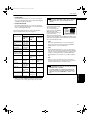
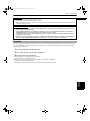
• The 3D PHONIC function works correctly only when
playing back a DVD VIDEO disc recorded with the Dolby
Digital. With other sources, you cannot get any effect if
you press the 3D PHONIC button.
• When playing back a DVD VIDEO disc recorded with the
Dolby Digital that does not contain the rear signal, you
cannot get a correct 3D PHONIC sound though you can
change the 3D PHONIC setting.
• The 3D PHONIC function does not affect the Dolby
Digital bitstream signal from the DIGITAL output jack.
• When you set the 3D PHONIC function is active, the
“DOWN MIX” and “COMPRESSION” setting in the
“PREFERENCE 2” display are disabled.
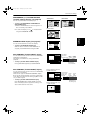
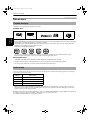
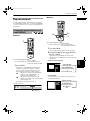
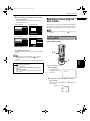
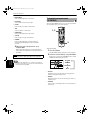
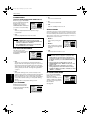
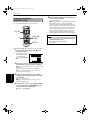
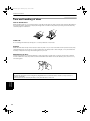
To check the disc time [TIME SELECT]
3
4
5
6
7
8
TIME SEARCH
9
10
11
12
13
14
15
16
PROGRAM
17
18
19
20
21
22
23
24
RANDOM
Time display
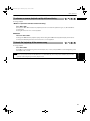
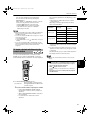
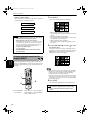
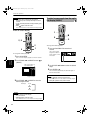
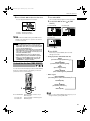
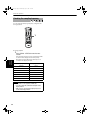
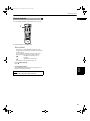
3 Press ENTER.
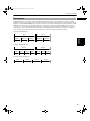
Each time you press ENTER, the time mode
changes as follows:
• During playback (for DVD AUDIO/Audio CD)
EACH
(current track elapsed time)
EACH REMAIN
(current track remaining time)
Advanced
operations
NOTES
2
TOTAL
(disc elapsed time)
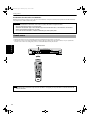
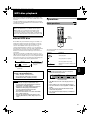
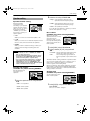
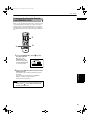
You can choose the time display mode for a DVD AUDIO,
Audio CD or Video CD disc in the display on the front
panel and in the on-screen display.
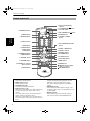
TV
3D
TV/VIDEO
PHONIC CANCEL RETURN
REPEAT
TV1
TV2
2
3
TV5
TV6
4
5
6
TV7
TV8
TV9
7
8
9
TV -/--
TV0
MUTING
10
0
+10
S.FREQ
S
PREVIOU
NEXT
¢
4
7
SELECT
3
W-
CH+
ME
5
5
VOL
+
5
ENTER
NU
∞
CH
OIC
CHE
TOTAL REMAIN
(total time of the disc)
8
¡
1
2
STROB
E
SLOW+
SLO
P
TO NU
ME
PROGRESSIVE
SCAN
- ZOOM +
PAGE
CLEAR
TOTAL (0:00)
VFP
ANGLE SUBTITLE AUDIO
DIGEST
EACH REMAIN
(recording time of the current track)
TV3
1
TV4
VOL
-
• While stopped
DVD
STANDBY/ON
TV
DVD
OPEN
/CLOSE
TOTAL REMAIN
(disc remaining time)
S
ON
CRE
EN
3
1
EACH (0:00)
REMOTE CONTROL
¶ For DVD AUDIO: During playback of audio only or
while stopped
For Audio CD:
During playback or while stopped
For Video CD:
While stopped
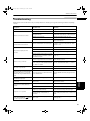
• When you select “EACH REMAIN” while stopped, you can
change the track by pressing 4 or ¢.
47