1
English
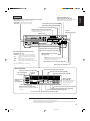
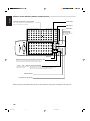
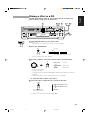
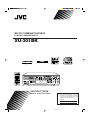
Names of the Parts
CD Parts/Common Parts
CD1, CD2, CD3 buttons, lamps and 0 buttons
(See pages 11, 12, 13)
These are used to listen to CDs. When the 0 button is pressed,
the corresponding tray is opened or closed.
POWER button and STANDBY lamp (See page 11)
This sets the power to ON from the OFF (standby mode), or vice
versa.
EDIT button
(See page 18)
TIMER/CLOCK button (See pages 45, 46)
This is used for setting the clock and programming the timer.
CANCEL button
(See page 18)
CD trays (trays 1, 2 and 3 from the bottom)
These are opened and CDs placed on them.
XU-301
CD
3
CD
2
CD
1
DISPLAY/CHARA button
(See page 17)
32kHz
MD-CD COMBINATION DECK
DIGITAL INPUT
44.1kHz
This button changes the contents of
the display window and the
character input mode.
TITLE button PLAY MODE button
(See page 18) (See pages 16, 23)
EDIT
48kHz
REC
PAUSE
REC
START
REC
STOP
DIGITAL
CD
LINE
PLAY MODE
Jog dial
(See pages
17, 45, 46)
SET
CANCEL
MIXING
3-CD
PLAY & EXCHANGE
DISPLAY
/CHARA
TITLE
MIC
REC SOURCE SELECTOR
STANDBY
TIMER CD PITCH CONTROL
/CLOCK
POWER
1st TRACK
REC
MD
CD REC
MIX BALANCE
REC LEVEL
LINE
MIC
MIN
CD
LISTENING
EDIT
NORMAL SPEED
SKIP
CD
LINE
MIC
MAX
PHONES
SAMPLING RATE CONVERTER
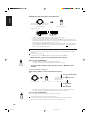
Remote control sensor
This receives the signals emitted by
the remote control.
Control buttons
Set the function to “CD” when using CDs or to
“MD” when using an MD, and then use the
control buttons.
• 1, ¡:
For forward search, reverse search (See
pages 15, 22)
• 7 (stop) :
For stopping play (See pages 12, 20)
• 6 :
For starting/pausing play (See pages 12, 20)
CD PITCH CONTOROL buttons
and indicators (See page 14)
1st TRACK REC button
and lamp (See page 30)
CD REC button and lamp (See page 29)
LISTENING EDIT and SKIP buttons
(See page 31)
Display window
“Paused” indicator (See page 12)
“Playing” indicator
(See page 12)
SET button
(See pages 17, 45, 46)
PHONES jack
Headphones which have been
purchased separately are
connected here.
CD button and lamp (See page 15)
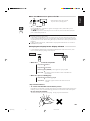
CD number displays
Track number displays
(See page 12)
(See page 12)
Play time displays
(See page 12)
CD
DISC
TITLE
PERFORMER GENRE
MD
L
R
CD numbers and play status
displays
40 30 20 15 10
6
3
Level meter
While a CD is playing, the display
lights in sequence to indicate that the Title mode display
disc is rotating. (See page 12)
(See page 17)
“TEXT” appears when CD text is
input.
0
DAILY
ONCE
MIX program
mode display
(See page 24)
MIX PROGRAM
2
3
1
RANDOM
REPEAT
ALL1 CD
Music calendar
Timer mode display
(See page 46)
This indicates the numbers of the
tracks. After a track is played, its
number is no longer indicated
Repeat play mode
display (See page 16)
Random play mode
display (See page 16)
CD play mode display
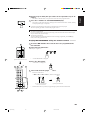
• This display is cleared when no CD has been detected on the tray and “NO DISC” is displayed.
This flashes if the CD pause
mode is established.
If this lights, it means that the CD
on this tray can be played.
6
04/p04-11(E)
6
4/1/98, 4:35 PM