1
Hardware Installation
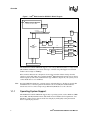
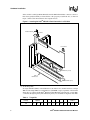
Figure 4. Terminating an Internal SCSI Disk Array
Terminator
ID2 – No Termination
ID1 – No Termination
ID0 – Boot Drive
No Termination
Intel® SRCU41L
Raid Controller
Host Computer
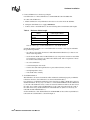
9. Power On Host System
Replace the computer cover, and reconnect the AC power cords. Turn power on to the host
computer. Ensure that the SCSI devices are powered up at the same time as, or before, the host
computer. If the computer is powered up before a SCSI device, the device might not be
recognized.
During boot, a BIOS message appears.
The firmware takes several seconds to initialize. During this time, the Intel® Raid Controller
SRCU41L scans the SCSI channel(s).
The Intel® Raid Controller SRCU41L BIOS Configuration utility prompt times out after several
seconds. The second portion of the BIOS message displays the Intel® Raid Controller SRCU41L
number, firmware version, and cache SDRAM size. The numbering of the controllers follows the
PCI slot scanning order used by the host mainboard.
10
Intel® SRCU41L Raid Controller User Manual