1
1.
2.
3.
4.
5.
6.
7.
8.
9.
10.
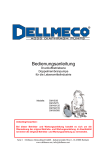
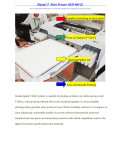
Top cover
Cleaning pad and head carriage access (press blue lever to release carriage)
LCD display panel
Cartridge Slot
IR lamp control
Waste container
Control Panel
Ink lever
Back plate with Main Power Switch, Power cord connectors, safety height switch reset button, Ethernet and
USB connector
Material height limit sensor
Placement of Your Printer
The DTS final destination MUST BE A STURDY TABLE OR OTHER
For operator comfort, we recommend the height of the platform no more than 60 cm. This table must be able
to support the full weight of your printer (80 kg). The table MUST also be able to incorporate the entire
"footprint" of the machine across its surface. NO PART of the Azon DTS should overhang an edge. Take the
printer out of the box carefully and place it on a table.