1
Serial Communication, cont’d
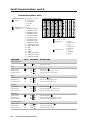
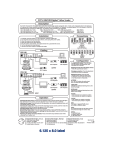
Command/response table
Symbol definitions:
= CR/LF, • = space
X1 = Inputs =
1 = Composite
2 = Component
3 = S-video
4 = RGB
X2 = Adjustment range 1-127
X3 = Output rate =
1 = 640x480 @ 60 Hz
2 = 640x480 @ 75 Hz
3 = 800x600 @ 60 Hz
4 = 800x600 @ 75 Hz
5 = 832x624 @ 60 Hz
6 = 832x624 @ 75 Hz
7 = 852x480 @ 60 Hz
8 = 852x480 @ 75 Hz
9 = 1024x768 @ 60 Hz
10 = 1024x768 @ 75 Hz
11 = 1280x1024 @ 60 Hz
12 = 480p
13 = 720p
14 = 1080p
15 = 848x480 @ 60 Hz
16 = 1280x768 @ 56 Hz
17 = 1360x765 @ 60 Hz
COMMAND
Input selection
ASCII
ASCII to HEX Conversion Table
•
X4
X5
X6
RESPONSE
DESCRIPTION
Sets input source
X1
!
C
X2
C
Col
Col
Col
X2
Tin
Tin
Tin
X2
X1
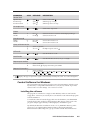
= 1 = On, 0 = Off
= Input type
0 = None
1 = NTSC 3.58
2 = PAL
3 = NTSC 4.43
4 = SECAM
= Detail level
1 = Low
2 = Medium
3 = High
Color
Specific value
Increment up
Increment down
{C
}C
X2
X2
Selects color X2
Selects next higher color value
Selects next lower color value
Tint
Specific value
Increment up
Increment down
X2
T
{T
}T
X2
X2
Selects tint X2
Selects next higher tint value
Selects next lower tint value
Contrast
Specific value
Increment up
Increment down
X2
^
{^
}^
Con
Con
Con
X2
X2
X2
Selects contrast X2
Selects next higher contrast value
Selects next lower contrast value
Brightness
Specific value
Increment up
Increment down
X2
Y
{Y
}Y
Brt
Brt
Brt
X2
X2
X2
Selects brightness X2
Selects next higher brightness value
Selects next lower brightness value
Horizontal shift
Specific value
Increment up
Increment down
4-4
X2
{H
}H
H
Hph X2
Hph+
Hph–
DVS 150 Serial Communication
Selects horizontal shift X2
Shift image right one step
Shift image left one step