1
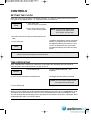
WEIGHT DEFROSTING
Auto Defrost lets you easily defrost food by eliminating guesswork in determining defrosting time.
Follow the steps below for easy defrosting.
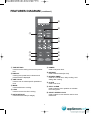
1. Touch Meat pad.
The g indicator light and "500" is displayed.
Meat
2. Select the desired defrosting weight.
(Refer to the weight defrost chart below.)
The display will show what you touched.
3. Touch START pad.
MEAT DEFROSTING begins.
1. Touch Poultry pad.
The g indicator light and "800" is displayed.
Poultry
2. Select the desired defrosting weight.
(Refer to the weight defrost chart below.)
The display will show what you touched.
3. Touch START pad.
POULTRY DEFROSTING begins.
1. Touch Fish pad.
The g indicator light and "300" is displayed.
Fish
2. Select the desired defrosting weight.
(Refer to the weight defrost chart below.)
The display will show what you touched.
3. Touch START pad.
FISH DEFROSTING begins.
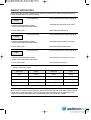
WEIGHT DEFROST CHART
Touch pad
MEAT
POULTRY
FISH
once
500 g
800 g
300 g
twice
800 g
1000 g
500 g
3 times
1000 g
1200 g
800 g
4 times
1200 g
1500 g
1000 g
The defrosting time is automatically determined by the weight selected.
When you touch START pad, the g indicator goes off and the Def. indicator blinks and the defrosting time
counts down in the display window. The oven beeps during the defrosting cycle to signal that the food
needs to be turned or rearranged. When the defrosting time ends, you will hear 3 beeps.
8