1
n 32 N
Using Your VAIO Computer
Using the Pointing Device
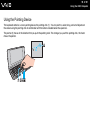
The keyboard contains a cursor-pointing device, the pointing stick (1). You can point to, select, drag, and scroll objects on
the screen using the pointing stick in combination with the buttons located below the space bar.
The pointer (2) moves in the direction that you push the pointing stick. The stronger you push the pointing stick, the faster
moves the pointer.