1
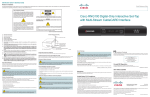
Front Panel
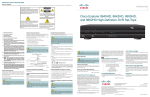
Explorer 8652HDC
CH+
VOL-
VOL+
POWER
SELECT
CH-
T14597
1 Power
1
2
3
4
GUIDE
5
6
INFO
EXIT
LIST
7 8 9 10 11
Turns the set-top on and off
2 VOL-, VOL+ Decreases and increases the volume
3 USB 2.0
Connects to external USB equipment approved by your service provider, software controlled
4 CH+, CH-
Scrolls up and down through the channels
5 Select
Accesses your on-screen selection
6 IR Sensor
Receives the infrared signal from the remote control
7 Guide
Accesses on-screen services, such as the on-screen guide, video-on-demand, or pay-per-view
8 Info
Displays a description of the selected program. This button is available from the on-screen menu
and while viewing a program
9 Exit
Exit menus, the on-screen menu, and program information
10 List
Displays the recorded list
11 Display
Displays the selected channel number and time of day. The display shows the following:
• MoCA Link ( )
• 480i / 480P
• 5.1
• Power ( )
) • HDTV
• 720i / 720P
• Message (
)
• Auto
• 1080i / 1080P
• Record (
Note: This illustration may vary from the actual product.
3