1
ete
s
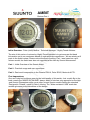
If the “Next” button is held in for 2 seconds the Ambit will enter “Settings” mode, similar to
the Core series. Settings from user weight, Alto/Baro functions, to pairing of devices such
as the Heart Rate Monitor strap can be preformed via the various menus.
Tu
ne
dA
thl
It did seem odd though with a GPS based watch that there was a Time/Date setting, sure it
would come in handy if you never used GPS, but then what would be the point of using an
Ambit. Even more complexing was the fact that only minutes and hours could be set ?
During the course of testing with GPS on, there seemed to be no syncronization at all
between the manual time setting and GPS based Zulu (GMT) time. One of the advantages
of using a GPS time source is that you virtually have atomic clock accuracy on your wrist.
When the battery did eventually flatten during testing, time and date settings were lost
which was a worry. I will point out once again that we were testing a pre-release model, so
final product could well and truly vary, we do hope so !
Just on the other buttons, the “Back/Lap” button allows you to back out of the menus,
takes a bit to get used to if you are familiar with other watches such as the Core using the
lower left button to back out. The other use for this button is to manually set a “lap split”
during an activity.
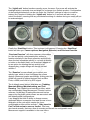
The “View” button provides the function of switching the lower data field on the display.
For example the day of the week, seconds, and dual time zone, can be rotated through on
the “Time” screen. The button also works on other screens such as the Altimeter and
Exercise screens to show extra metrics such as temperature and averages.
Hi
gh
ly
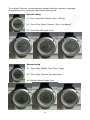
Holding in the “View” button for 2 seconds will invert the display, then back again if held in
for another 2 seconds. The inverted display does look more aesthetically appealing on the
Black Ambit, but great to have the option on either model to be able to switch at any time.
The inverted display is also easy to read at night with the backlight.
7