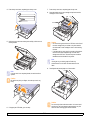
1
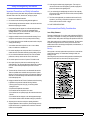
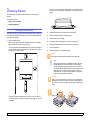
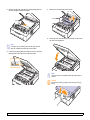
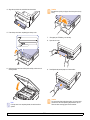
10 Hold both edges of the rear cover, and align it as shown in the
following figure. Press the rear cover firmly until it clicks.
2
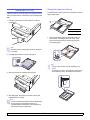
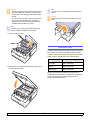
Carefully take the jammed paper out of the machine.
Caution
Do not touch the fuser inside the machine. It is hot and could
cause burns! The fuser's operating temperature is very hot.
Take care when removing paper from the machine.
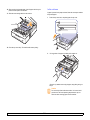
3
Hold both edges of the rear cover, and align it as shown in the
following figure. Press the rear cover firmly until it clicks.
Note
If the rear cover is not completely closed, the paper jam may
occur.
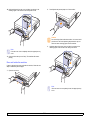
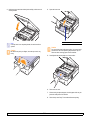
11 Open and close the top cover firmly. The machine will resume
printing.
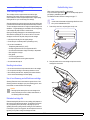
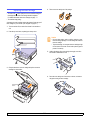
Rear and inside the machine
If paper is jammed in the rear and inside the machine, follow the next
steps to release the jammed paper.
1
Open the rear cover.
Note
If the rear cover is not completely closed, the paper jam may
occur.
7.3
<Troubleshooting>