1
TEACdvwd17h.book Page 25 Sunday, May 1, 2005 6:28 PM
Appendix B. LCD Messages
This appendix explains the messages that may appear on the LCD panel.
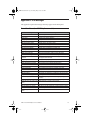
Normal Conditions (for all DVD Duplicator models)
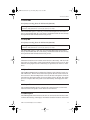
Message
Meaning
Initialize SDRAM
Detect drives
User Abort
Analyzing
Source Drive Not Ready
Target Drive Not Ready
Erasing disc
Source Disc Not Ready
Target Disc Not Ready
Fail to get Drive Info!
Fail to get SRC Disc Info!
Save new config Fail!
Load Default Config?
Src&Tgt can't in the same
channel
Preparing
Check Target Please Wait
Audio Disc!!!Can't compare!
Identical
Read disc error
Cannot read TOC
TOC not match
Source Disc Empty!!!
Target overflow
Target Disc Not Empty!!!
Press a Key to Eject Good Disc
Initialize system memory.
Detect the drives connected to the system.
Cancel a job during operation.
Analyze the source disc.
Source drive is not ready to read.
Target drive is not ready to write.
The system is erasing the data on the disc.
Source disc is not ready to be read.
Target disc is not ready to be written into.
Drive information cannot be obtained.
Information about a source disc cannot be obtained.
The new configuration settings cannot be saved.
Do you want to load the default settings?
During comparison, the source and target discs cannot
occupy the same channel.
The system is preparing to record.
The system is checking the target device.
The system cannot compare the audio disc.
Comparison results are identical.
During a comparison, the disc could not be read.
The system cannot read the contents of the disc.
Comparison results are not identical.
The source disc contains no data.
The target disc capacity is insufficient to store new data.
The target disc still contains data.
Press any key to eject a disc after copying. (Copy successful.)
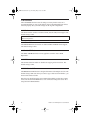
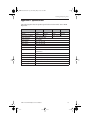
Press a key to Eject Fail Disc
Press any key to eject a disc after copying. (Copy failed.)
DVD-RW does not Support the DVD-RW does not support this function.
Func
Hold ESC to exit
Press ESC for one second to terminate the test.
All data will be lost, erase?
All data on the disc will be lost. Confirm erasure request.
Erase Finished
The erasing of the data is complete.
No Erasing to Disc in DVDThe disc in the DVD-RW drive is not rewritable.
RW!!
TEAC Tower DVD Duplicator User’s Manual
25