1
1) in the room to be monitored. If this handset
detects a sound level greater than a certain
threshold, it will automatically initiate an internal
call to the selected handset (e.g. handset 2).
7.8.1 Activate Babysit Mode
Note
In Babysit mode, all keys are deactivated except
for mMENU key. The handset cannot perform
any normal operation (making an outgoing call,
receiving an incoming call, intercom another
handset, paging, etc.) once this function is
activated.
7.10 Set Theme Colour
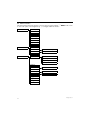
1 Press m MENU in idle mode, scroll : to
Personal Set and press mSELECT, scroll
: to Theme Colour and press mSELECT.
2 Scroll : to Theme Colour 1, Theme Colour
2 or Theme Colour 3 and press mSELECT
to confirm.
• A validation tone is emitted.
1 Press m MENU in idle mode, scroll : to
Personal Set and press mSELECT, scroll
: to Babysit mode and press mSELECT.
• Babysit mode is displayed on the screen.
: through the list of handsets
available and press mSELECT to select the
handset to be called.
2 Scroll
7.8.2 Deactivate Babysit Mode
1 Press m MENU in idle mode, select Off and
press mSELECT.
7.9 Set Backlight time
1 Press m MENU in idle mode, scroll : to
Personal Set and press mSELECT, scroll
: to Backlight Time and press
mSELECT.
: to 20s, 40s or 60s and press
mSELECT to confirm.
2 Scroll
• A validation tone is emitted.
Note
By default, the backlight remains on for 20
seconds after each activation such as an incoming
call, key presses, lifting the handset off the base
station, etc.
Personal settings
29