1
*En_A933_02.fm Page 6 Tuesday, January 25, 2005 1:46 PM
Front & Rear Panels
Front Panel
1 23 4
5 6
7
MD
LINE
TAPE /CDR
CD
STANDBY/ON
TUNER
ON(G)
STANDBY(R)
PHONO
SUPER BASS
POWER
ON
PHONES
OFF
8
A
SPEAKERS
BASS
B
9
TREBLE
TO N E ( R )
DIRECT (G )
MAX
0
A
B
MAIN IN
C D
For detailed information, refer to the pages in parentheses.
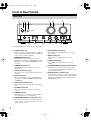
A POWER switch (17)
This is the main power switch. When set to OFF, the
A-933 is completely shutdown. When set to ON, the
A-933 can be set to On or Standby.
B STANDBY/ON button (17)
This button is used to set the A-933 to On or
Standby. For models with a [POWER] switch, this
button has no effect unless the [POWER] switch is
set to ON.
C STANDBY indicator (17)
This indicator lights up when the A-933 is in
Standby mode.
D Remote control sensor (9)
This sensor receives control signals from the remote
controller.
E Input selector (17)
This control is used to select from the following
input sources: PHONO, TUNER, CD, LINE, MD,
or TAPE/CDR.
F Input selector indicator (17)
These indicators show the currently selected input
source.
G VOLUME control (18)
This control is used to adjust the volume of the
A-933.
H PHONES jack (18)
This phone jack is for connecting a standard pair of
stereo headphones for private listening.
I SPEAKERS A/B buttons & indicators (17)
These buttons are used to select which speaker set,
A or B, outputs sound. The indicators show if each
speaker set is on or off.
6
J SUPER BASS control (18)
This control is for adjusting the level of very-low
bass sounds.
K BASS control (18)
This control is for adjusting the level of bass
sounds.
L TREBLE control (18)
This control is for adjusting the level of treble
sounds.
M TONE(R)/DIRECT(G) button & indicator (18)
This button is used to select Tone mode or Direct
mode. The indicator lights up red (R) in Tone mode;
green (G) in Direct mode.
N MAIN IN button & indicator (19)
When the A-933 is used as a power amplifier with a
separate preamp, this button is used to set the MAIN
IN function. The indicator lights up blue while the
MAIN IN function is on.