1
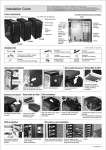
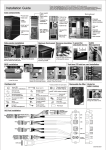
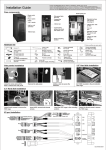
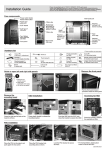
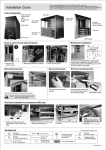
Hard disk installation
Put anti-vibration rubber
pads to reduce vibration
on HDD tray.
Close the gate to secure the HDD
tray.
Insert the HDD into
the HDD cage
Close the plastic brackets
to secure.
Open the plastic brackets
on HDD tray.
Slide the HDD tray into the
HDD cage.
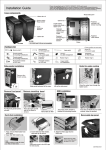
NOTE:
(Open the plastic bracket to release the HDD
from HDD tray)
Secure the
2.5” HDD to
HDD tray with
four screws.
Remove HDD cage (HDD cage can be rotate 90 degree)
Base
Loose three screws to release the
tool-less HDD cage .
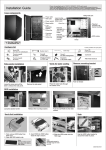
Base
Loose thumb screw to release
the gate.
Rotate the HDD cage 90 degree
to the specific mounting point
Secure the HDD cage with screw as hown
above
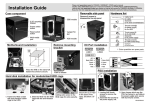
Secure the stand-off
bolts on the M/B tray
which match with the
M/B fix points, place
the M/B on the
stand-off, fasten the
screws to secure.
Insert the gate to the HDD cage, secure it with the thumb screw.
C50.07FN0.00E-2