1
INTRODUCTION
2
7. Configure the other device parameters via VisiSet™ [Operating Mode, Calibration, Data
Collection parameters, etc.].
8. If using the CBX connection box equipped with a BM100 Backup module, perform Device
Backup at the Slave.
The Slave device is now Configured. Repeat these steps for each Slave reader in the IDNET™ network.
Configuration of Master
1. Connect a PC equipped with VisiSet™ to the Main, or Auxiliary interface of the planned
Master reader.
2. Launch VisiSet™ and connect to the Master reader.
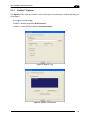
3. From the VisiSet™ Device Menu select "Parameter Setup".
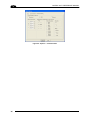
4. Set the Role of the Master reader (Synchronized or Multidata) from
Reading System Layout > Device Network Setting > Topology Role parameter.
the
5. Enable the planned Slave device N from the Reading System Layout >
Expected Slave Device #N > Status parameter and, if desired, set the related
identification string from the Expected Slave Device #N > Device Description parameter.
Repeat this step for all planned Slave devices.
6. If necessary, set the ID-NET™ baudrate from the Reading System Layout >
Device Network Setting > Network Baud Rate parameter, (500 kbs default).
7. Configure the other device parameters via VisiSet™ [Operating Mode, Calibration, Data
Collection parameters, etc.].
8. If using the CBX connection box equipped with a BM100 Backup module, perform Device
Backup at the Master.
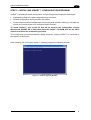
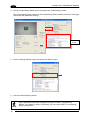
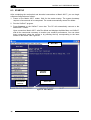
9. From the VisiSet™ Device Menu select "ID-NET™ Status Window" and click on the
"Look For Devices On Network" button to check the status of the expected Slave devices
within the ID-NET™ network.
The reader network is ready.
21