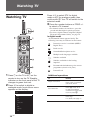
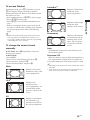
1
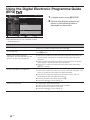
Using the Digital Favourite List Prog Service Name 001 BBC ONE 002 BBC TOW 003 ITV 1 004 five 005 Channel 4 006 BBC THREE 007 BBC FOUR 008 TV 3 009 NRK2 Service Type ALL TYPE Network Move Tune Select CA FAV1 FAV2 Network Delete Page Up/Down FAV3 FAV4 All Networks Service Type RETURN Back This function may not be available in some countries/ regions. To Do this Add or remove channels from a favourite list 1 Press F/f to select the channel you want to add to the favourite list. 2 Press G/g to select the favorite list to which the selected channel will be added, then press 3 . symbol appears under the relevant favorite list for the channel 3T added. 4 To remove a channel from the favorite list, select the relevant channel from the favorite list and press 3. T symbol will disappear. 5 Press RETURN O to finish setting up. Select a favourite list 1 Press T to select a favorite list. 2 In Favourite List menu, press F/f to select one of the lists from FAV1 to FAV4, then press 3 . Watch a channel 1 Open the desired favourite list. 2 Press F/f to select a channel, then press 3. Turn off the Favourite List 1 Press RETURN O 17 GB Watching TV You can create four different favourite channel lists. 1 Perform the following operations to open the programme table. MENU p f p Settings p 3 p f p Channel Setupp 3 p f p Programme Tablep 3. 2 Perform the desired operation as shown in the following table or displayed on the screen. Programme Table