1
4620SW/4621SW SIP IP Telephone Options
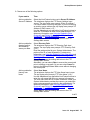
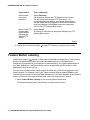
Status Screen Viewing Options
Four views of telephone and system information are available. You usually do not need to view
this information. However, if problems occur, your System Administrator might ask you to report
certain values from any status screen.
Note:
Status screen data can be viewed, but cannot be changed.
Note:
1. Select View IP Settings from the Options Main screen, accessed by pressing the Options
button.
The telephone displays the View Status Main Screen.
2. To select any option on this screen, press the Line/Feature button on either side of that
option. Use the Page Right or Page Left Indicator buttons to scroll from one screen to
another, as applicable.
3. To return to the first Options Main screen from any status screen, press the Return softkey.
Note:
Each option is described in the following subsections.
Note:
Viewing IP Address Status
Internet Protocol (IP) address information encompasses two screens and identifies certain
components and connections. IP Address information includes:
●
the location (address) of your telephone on your telephone system Call Server,
●
the location and port (connection) of the Call Server itself,
●
the call routing and mask addresses, and
●
the identification of the File Server with which your telephone interacts.
This information is technical in nature. However, your System Administrator might need this
information to track questions about or problems with telephone functions or connections.
Viewing Quality of Service (QoS) Status
QoS refers to several mechanisms used to improve audio quality over the network.
66 4620SW/4621SW SIP IP Telephone Release 2.2 User Guide