1
IA260 WinCE User’s Manual
Getting Started
To illustrate how to match the settings to your application, let’s assume that your development
workstation has a LAN port at 192.168.1.5, and the Domain Name Server (DNS) is at 192.168.2.6.
In this case, you should issue the following command:
\> netconfig –n LAN1 –i 192.168.1.5 –m 255.255.255.0 –g 192.168.1.254 –d 192.168.2.6
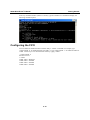
Use netconfig command without parameters to view the new settings:
\> netconfig
LAN1 Interface Configuration:
IP Address: 192.168.1.5
SubNet Mask: 255.255.255.0
Gateway:
192.168.1.254
DNS:
192.168.2.6
LAN2 Interface Configuration:
IP Address: 192.168.4.127
SubNet Mask: 255.255.255.0
Gateway:
DNS:
Virtual Private Network (VPN)
Windows Embedded CE supports Virtual Private Networks (VPNs). The VPN support in
Windows Embedded CE includes Layer Two Tunneling Protocol (L2TP), IP Security Protocol
(IPSec), and Point-to-Point Tunneling Protocol (PPTP). L2TP/IPSec enables enhanced security for
Virtual Private Network (VPN) client connections from Windows Embedded CE-based devices to
corporate servers. PPTP is a Network protocol that adds a security infrastructure for the transfer of
data from a remote client to a private enterprise server, which creates a VPN by using
TCP/IP-based data networks.
Currently, this function is supported only by the IA260-CE. For VPN questions concerning the
IA261-CE and IA262-CE, please contact Moxa’s Technical Support team.
2-6