1
UPort 1200/1400/1600 Series User’s Manual
Driver Installation
Port Settings
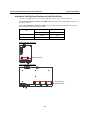
Auto Enumerating COM Number
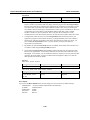
If the “Auto Enumerating COM Number” checkbox is checked, COM numbers will be
assigned automatically and in sequence to the ports. E.g., COM3 to Port 1, COM4 to Port 2,
etc.
If you do not enable this check box, only the first COM Number will be changed to new COM
number list in the drop-down list box. Enable this function if you want to configure several
ports with sequential numbers.
Friendly Name
Setting
Factory Default
Necessity
1 to 20 characters
Moxa UPort COM
Optional
(E.g., UPort 1610-8)
Use the “Friendly name” to allow easy identification of the serial devices that are connected to
the UPort’s serial ports.
UART FIFO
Setting
Factory Default
Necessity
Enable/Disable
Enable
Required
The UPort’s serial ports provide a 128-byte FIFO both in the Tx and Rx directions. Disable
UART FIFO setting when your serial device does not have a FIFO to prevent data loss during
communication. For a slow serial device, we recommend you disable FIFO to improve the
latency. If you want to use XON/XOFF flow control, we recommend disabling UART FIFO.
Tx Mode
Setting
Factory Default
Necessity
Hi-Performance, Classical Hi-Performance
Required
To improve the write performance, you can select Hi-Performance mode. Under classical
mode, the driver will not notify the user’s program that Tx is completed until all Tx data has
been sent out from the UPort; this mode will cause lower throughput. If you want to ensure
that all data is sent out before further processing, classical mode is recommended. Classical
mode is the same as the COM Port behavior: The WriteFile() call will only finish when all
queued data are sent out.
2-17