1
First-time Operation
8
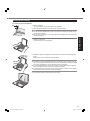
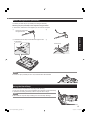
Perform the screen calibration.
NOTE
Perform the following calibration for each user.
Rotate the display to primary landscape before performing the calibration.
<Only for model with digitizer>
Getting Started
(Start) - [Control Panel] - [Hardware and Sound] - [Tablet PC Settings].
A Click
B Click [Calibrate].
C Click [Pen input].
D If [User Account Control] is displayed, click [Yes].
E Using the digitizer pen, touch each of the “+” target marks one by one, and
then click [OK].
F Repeat steps A and B.
G Click [Touch input].
H If [User Account Control] is displayed, click [Yes].
I Using the finger, touch each of the “+” target marks one by one, and then click [Yes].
A Click [start] - [Control Panel] - [Printers and Other Hardware] - [Tablet and
Pen Settings].
B Click [Calibrate…].
C Click [Pen].
D Using the digitizer pen, touch each of the “+” target marks one by one and
then click [OK].
E Repeat steps A and B.
F Click [Touch].
G Using the finger, touch each of the “+” target marks one by one, and then
click [Finished].
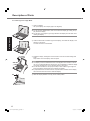
<Only for model with touchscreen>
(Start) - [Control Panel] - [Hardware and Sound] - [Tablet PC Settings].
A Click
B Click [Calibrate].
C If [User Account Control] is displayed, click [Yes].
D Using the stylus, touch each of the “+” target marks one by one, and then
click [Yes].
A Click [start] - [Control Panel] - [Printers and Other Hardware] - [Tablet and
Pen Settings].
B Set the following with [Calibrate] in [Settings].
C Using the stylus, touch each of the “+” target marks one by one, and then
click [Yes].
9
Create a new account.
Click [start] - [Control Panel] - [User Accounts] - [Create a new account].
CAUTION
Remember your password. If you forget the password, you cannot use the Windows operating system. Creating a password reset disk beforehand is recommended.
18
CF-C1mk1(CPE02283YA)_OI_EN.indb 18
10/15/2010 11:20:59 AM