1
User Manual
English
Installation
PC Version
1. Simply attach the Data Transfer Cable to an available USB port on each of the computers you want
to connect
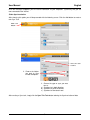
2. When using Windows 2000/XP, the cable will automatically be detected and the EasySuite file
transfer interface will open, you may now start to use the application
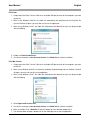
3. When using Windows Vista/7, the cable will automatically be detected and you will be presented
with the following
4. Double click Run EasySuite.exe
5. You will the encounter a User Account Control, click Allow/Yes to start the installation
PC & Mac Version
1. Simply attach the Data Transfer Cable to an available USB port on each of the computers you want
to connect
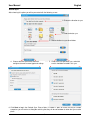
2. When using Windows 2000/XP, the cable will automatically be detected and the “GoSuite” interface
will open, you may now start to use the application
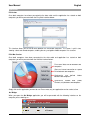
3. When using Windows Vista/7, the cable will automatically be detected and you will be presented
with the following
4. Select Open folder to view files
5. You will the encounter a User Account Control, click Allow/Yes to start the installation
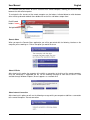
6. When using Mac OS X, a GoSuite CD Icon will appear on your desktop, double click it
7. The GoSuite folder will open, double click on the GoBridge icon to start the application
-2-