1
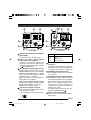
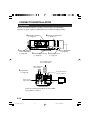
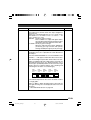
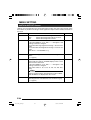
Control by Black-White/Colour switching signal from the outside
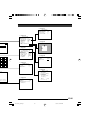
Carry out the following setting when you link in motion the black-white/colour switching of this
unit and infrared illumination, etc., using the switching signal from the outside control device.
Infrared illumination, etc.
-
1
2
CLASS 2 ONLY(U TYPE)
ISOLATED POWER ONLY
(E TYPE)
+
AC24V
DC12V
Switching
signal
B&W: Make signal
COLOUR: Break
signal
TX+ TX- RX+ RX- AUX GND
A
B
C
D
Sensor or switch
Y/C OUT
SYNC IN
VIDEO OUT
SEE INSTRUCTION
MANUAL
POWER
Outside control device
It is requested that you consult our JVC dealer about connecting
devices, etc.
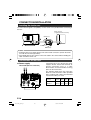
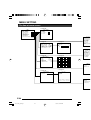
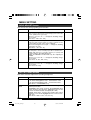
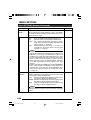
Set the B&W item to AUX.
MENU button SET button
SET
AWC
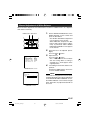
1.
Select B&W/COLOUR MODE on
the ALC SETTING screen.
2.
Press the SET button.
CAMERA
SETUP
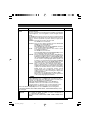
• The B&W/COLOUR MODE screen
appears.
MENU
A L C SE T T I NGS
3.
Press either the button or the
button and select the B&W
item.
4.
Press either the button or the
button and set to “AUX”.
I R I S L E VE L
NORMAL
A V E RA GE : P EAK
8:2
N O RMAL
S H UT T ER / E x DR
A G C MODE
2 0 dB
L O L U X MODE
OF F
S E NS E U P
OF F
PR I OR I T Y
MO T I ON
B LC
EDI T 1
B&W/COLOUR MODE . .
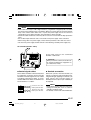
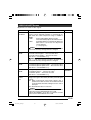
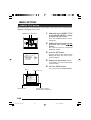
Then, the AUX TERMINAL item on the
MODE SELECT screen is automatically
set to (B&W IN). Refer to Page 33.
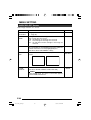
5.
• Then, the ALC SETTING screen is
brought back.
B&W/COLOUR MODE
B&W
AU TO L E V E L
Upon completion of setting,
press the MENU button.
AUT O
NORMAL
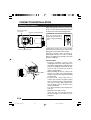
CAUTION:
When you use near infrared ray illuminations, use a lens that is compatible
with the near infrared ray illuminations.
Any lens other than the compatible one
can result in out-of-focus due to such
characteristics.
E-41
TK-C1430_23-44_E
41
05.6.20, 10:42 AM