1
English
9 Connect devices
This section describes how to connect various devices with different
connectors and supplements examples provided in the Quick Start.
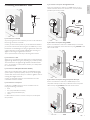
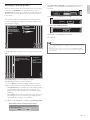
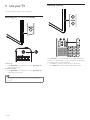
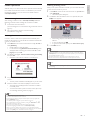
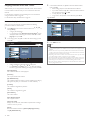
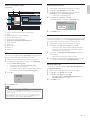
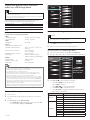
Connection overview
e
f
g
h
SERVICE
ONLY
PC-IN
RGB
i
*
j
a
k
b
l
c
d
a PC input jack
VGA cable connection for PC.
i HDMI 2 input jack
Second HDMI in connector.
b digital audio output jack
Digital audio output to home theaters and other digital audio
systems.
j HDMI 1 input jack
First HDMI in connector.
c component 1 video and audio input jack
Video input from analog devices such as DVD, receiver, game
console, etc. This connector is used with audio input.
d antenna input jack
Signal input from an antenna, cable or satellite.
e USB terminal
Data input from USB storage devices only. Do not connect any
device to this terminal such as; digital camera, keyboard, mouse, etc.
f LAN
Telecommunications equipment with LAN cable in connector.
g HDMI 4 input jack
Digital audio and video input from high definition digital devices
such as Blu-ray players.
h HDMI 3 input jack
Third HDMI in connector.
k audio input jack for HDMI 1 and PC
l component 2 video / composite video and audio input jack
Video input from analog devices such as DVD, receiver, game
console, etc. This connector is used with audio input.
*service only
For use by service personnel only.
Caution
• Disconnect the AC power cord before connecting devices.
Note
• Do not use an extension cord between the USB flash memory and the unit. Always
insert the USB flash memory to this unit directly.
• Different types of connectors may be used to connect a device to your TV, depending
on availability and your needs.
EN
33