1
4.1
INCLUDED FANS
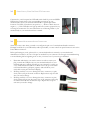
Rear TwoCool™ Fan – There is a 120 x 25 mm TwoCool™ fan preinstalled at the rear of the case. The fan is
installed so the air will be blown out of the case. This fan comes with a two-speed switch that let you choose the
speed best suited to your need. The default fan speed setting is Low.
120 mm TwoCool™ Specifications
Size:
120 x 25 mm TwoCool™ fan
Rated Voltage:
12V
Operating Voltage:
10.8V ~ 13.2V
Speed
(RPM)
Input
Current
Airflow
Static
Pressure
Acoustic
Noise
Input
Power
High
1500
0.30A
(Max.)
1.4 m³ / min
(51.2 CFM)
1.2 mm-H 2 O
(0.05 inch-H 2 O)
27.9 dBA
3.6W
Low
900
0.18A
0.08 m³ / min
(30.1 CFM)
0.5 mm-H2O
(0.02 inch-H2O)
16.9 dBA
2.2W
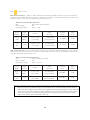
Top TwoCool™ Fan – The case comes with a 140 mm top exhaust fan. The fan is installed so the air will be
blown out of the case. This fan comes with a two-speed switch that let you choose the speed best suited to your
need. The default fan speed setting is Low.
140 mm TwoCool™ Specifications
Size:
140 x 25 mm TwoCool™
Rated Voltage:
12V
10.8V ~ 13.2 V
Operating Voltage:
Speed
(RPM)
Input
Current
Airflow
Static
Pressure
Acoustic
Noise
Input
Power
High
1200
0.3A
(Max.)
1.7 m³ / min
(58.9 CFM)
0.8 mm-H2O
(0.03 inch-H2O)
26.0 dBA
3.6W
Low
800
0.2A
0.95 m³ / min
(33.6 CFM)
0.3 mm-H2O
(0.01 inch-H2O)
21.8 dBA
2.4W
Note: The minimum voltage to start a typical TwoCool™ fan is 5V. We recommend that you set the fan speed to
High if you choose to connect the fan(s) to a fan control device or to the Fan-Only connector found on
some Antec power supplies. A fan control device regulates the fan speed by varying the voltage, which may
start as low as 4.5V to 5V. Connecting a TwoCool™ fan set on Low to a fan-control device may result in
the fan not being able to start because the already lowered voltage from the fan control device will be
further reduced by the TwoCool™ circuitry below 5V.
14