1
Set alarm timer
Set alarm
In standby mode, you can set two alarms to
ring at different time.
Note
•• Make sure that you have set the clock correctly.
1
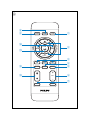
Press and hold AL1/AL2 for two seconds
to activate alarm setting mode.
»» The hour and minute digits begin to blink.
2
Press / and
/
repeatedly to
set the hour and minute.
3
Press AL1/AL2 to confirm.
••
The alarm repeats ringing for the
next day.
E ENnGL
g l i IS
s hH
6 Other features
Snooze alarm
When alarm sounds, press SNOOZE.
»» The alarm snoozes and repeats ringing
nine minutes later.
Set sleep timer
This clock radio can switch to standby mode
automatically after a preset period.
Press SLEEP repeatedly to select the sleep timer
period (in minutes).
»» When the sleep timer is activated,
appears.
To deactivate the sleep timer, press SLEEP
repeatedly until [OFF] (off) appears.
Select alarm source
Note
15
•• For alarm sound, you can select buzzer, your
last listened radio chanel, or latest played
audio in your iPod/iPhone.
Adjust AL1/AL2 RADIO·BUZZ·DOCK
control to select alarm source for both alarms.
Tip
•• When alarm time comes, the selected radio,
buzzer, or iPod/iPhone turns on.
•• If iPhone is selected as alarm source, while
no iPod/iPhone is connected, the clock radio
switches to buzzer source instead.
Activate/deactivate alarm timer
1
2
Press AL1/AL2 to view alarm settings.
Press AL1/AL2 again to activate or
deactivate the alarm timer.
»» The alarm icon appears if alarm timer
is on and disappears if it is off.
••
To stop the ringing alarm, press the
corresponding AL1/AL2.
30
60
90
120
off
Play audio from an external
device
You can listen to audio from an external device
through this clock radio.
1
Connect the MP3 link cable to:
•• the MP3 LINK socket.
•• the headphone socket of an external
device.
2
Press MP3 LINK to select MP3 link
source.
3
Start to play the external device (see the
user manual of this device).
Adjust display brightness
Press BRIGHTNESS repeatedly to select
different brightness levels.
EN
9