1
English
a. Download Yahoo Messenger at http://messenger.yahoo.com and
finish the registration, if you don’t have it.
b. Sign onto Yahoo Messenger.
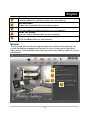
c. From the main window, click Tools menu, then select “Start My
Webcam”.
d. Right-click on a name in your Messenger List and choose “View
Webcam”.
e. Your friend will then receive an invitation message. When your
friend clicks YES, the video chat will start.
f. For the further information, refer to the website at
http://messenger.yahoo.com
AOL Instant Messenger
a. You can download AOL Instant Messenger free at
http://www.aim.com and finish the registration, if you don’t have it.
b. Sign onto AOL Instant Messenger.
c. Click on “Show Messenger Lists” and choose the friend you want
to start with video chat.
d. Your friend will then receive an invitation message. When your
friend confirms to talk, the video chat will start.
e. For the further information, refer to the website at
http://www.aim.com
NOTE
Make sure you already connected the camera to the computer before
running any video conferencing or video chat programs.
Also make sure you close other webcam programs before running the
video conferencing or video chat program.
-4-