1
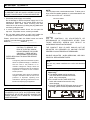
NAMES AND FUNCTIONS
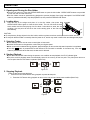
Control Unit
more to resume playback.
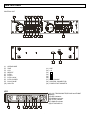
(1) OPEN/CLOSE
Press this button to open and close the disc holder. The
main unit also includes OPEN/CLOSE buttons. The disc
holder cannot be opened during playback, so stop
playback before pressing the button.
(2) TIME (Time Button)
Press this button to switch the time display among the
elapsed time and remaining time and total remaining time
of the disc.
(3) LCD
(4) REPEAT
(5)
(6)
(7)
(8)
(9)
(10) SGL/CTN (Single/Continuous Button)
Press this button to switch between the single and
continuous play modes. The SINGLE mode is indicated
by the SINGLE indicator on the LCD.
(11) CUE (Cue Button)
Press the CUE button during playback to return to the
position at which playback started.
(12) +10
Use the button to skip ahead 10 tracks.
(13)
Use these button to go back to the beginning of the
current track or select a previous track for playing.
(14) ,(15)
Press these buttons to perform the scan function during
pause mode or during play mode.
(16)
Use these buttons to skip to the next CD track.
(17)PITCH RANGE
Choose from pitch percentages of 4%, 8% and 16%.
(18)CONTROL CONNECTOR
Connect this connector to the REMOTE connector on the
main unit using the included control cord.
(19)FADER START SOCKET
Via the Control socket, the respective CD player can be
remotely controlled. If you are using a mixer with fader
start-function connect the player with the Control Outsocket. Please note that these sockets must never be
connected with any voltage.
To place the unit into REPEAT mode press this button.
Once the unit is in REPEAT mode the current track will
play until the button is pressed again.
PITCH - BUTTON
The CD slows down while this button is pressed.
Release the button to return to the original BPM.
PITCH + BUTTON
The CD speeds up while this button is pressed.
Release the button to return to the original BPM.
PITCH LOCK
Use these button to enable or disable BPM adjustment
with the pitch sliders. BPM adjustment with the pitch
sliders is disabled when the PITCH LED lights.
PITCH SLIDER
Use the slider to adjust the CD pitch. Slide up to
decrease the pitch, down to increase the pitch.
PLAY/PAUSE
Use the button to start playback. Press once to start
playback, once again to set the pause mode, and once
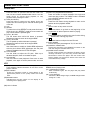
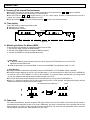
LCD
Indicates that the time shown on the display is the TOTAL
REMAIN time of playing track.
(27) CONTINUOUS Indicator
When CONTINU lights, the CD player will play tracks
continuously.
(28) PITCH DISPLAY
It shows the BPM change range, the BPM changes within
a range of +/-16%.
(20)-(23)Track, Minute, Second and Frame Displays
These displays indicate information for the CD’s current
position and time.
(24)BAR Indicator
These ten indicators provide a visual display of the
approximate position of the pickup within the current
track.
(25)REMAIN Indicator
Indicates that the time shown on the display is the
remaining time of playing track
(26)TOTAL Indicator
6