1
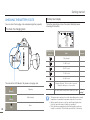
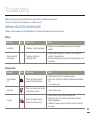
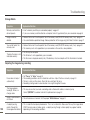
Troubleshooting
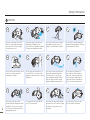
Message
Icon
Informs that ...
Action
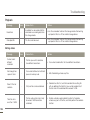
Card Locked
The write protection tab on an SD
• Release the write protection tab.
or SDHC card has been set to lock.
Card Error
The memory card has a problem
and the camcorder cannot
recognize it.
• Replace the memory card with another card.
Not Formatted
The memory card is not formatted
in this camcorder.
• Format the memory card using this camcorder.
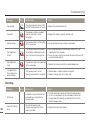
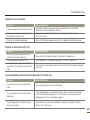
Not Supported
Format
The memory card may have been
formatted by another device and
may still have existing images on
it.
• Files cannot be played as the memory card format is not
supported by the camcorder.
• Format the card using the camcorder or replace the card with
a card formatted correctly.
Not Supported
Card
The memory card is not supported
in this camcorder.
• Replace the memory card with a recommended card.
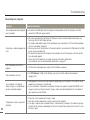
The memory card is not fast
enough to record at this resolution.
• Record video at a lower resolution and quality.
• Replace memory card with a faster card.
Low Speed Card.
Please record at a
lower resolution.
-
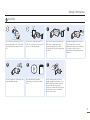
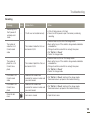
Recording
Message
102
Icon
Informs that ...
Action
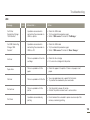
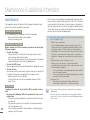
Write Error
-
A problem has occurred while the
camcorder was writing data to
storage media.
• Turn the camcorder's power off and on for data recovery.
• If a file is not recovered, use the camcorder to format the
storage media after backing up important files to a PC or
another storage media.
Release the Smart
Auto
-
You cannot operate some
functions manually when Smart
Auto is activated.
• Release the Smart Auto function.