1
Español
Italiano
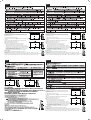
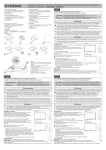
Installing stand:
You use this stand for both size 20" (EX201W) and 23" (EX231W/EX231Wp)
by change attachment foot.
CAUTION: Do not use this stand for EX201W with attachment foot for
EX231W/EX231Wp. It may cause monitor fall down and make serious
damage to the monitor.
For EX201W user: Proceed to step 3 .
For EX231W or EX231Wp user: Change attachment foot following the below
instruction.
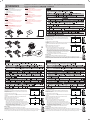
1 Press Quick Release Button A and pull out the attachment foot.
For EX201W
Unidad: mm
For EX201W user: Proceed to step 3 .
For EX231W or EX231Wp user: Change attachment foot following the below
instruction.
1 Press Quick Release Button A and pull out the attachment foot.
Peso: ??
For EX231W / EX231Wp
2 Attach the attachment foot with "23 only".
3 1) Turn off the power to the monitor.
Unità: mm
Peso: ??
For EX231W / EX231Wp
2) Paste two rubber feet B on the bottom of the monitor.
3) Place monitor face down on a non-abrasive surface.
NOTE: Handle with care when placing monitor face down to avoid
damaging the front control keys.Put the upper hooks of the stand in the
slot of the monitor then push stand into monitor in direction of the arrow Peso: ??
as shown and confirm that the stand is locked. Open the stand with
widely extended until feeling a "click" feeling.
To reattach the stand, please refer to monitor's user's manual.
Before using:
Use this stand with widely extended until feeling a "click" feeling.
CAUTION: Improper setting may cause the monitor fall down and make serious damage to the monitor.
Human Sensor position is below as normal stand. Please make sure there is no object in front of Human Sensor.
Be sure to observe the cautions described in the monitor's operating manual when handling the monitor.
日本語
Weight: ??
For EX201W
2 Attach the attachment foot with "23 only".
3 1) Turn off the power to the monitor.
2) Paste two rubber feet B on the bottom of the monitor.
3) Place monitor face down on a non-abrasive surface.
NOTE: Handle with care when placing monitor face down to avoid
damaging the front control keys.Put the upper hooks of the stand in the
slot of the monitor then push stand into monitor in direction of the arrow Peso: ??
as shown and confirm that the stand is locked. Open the stand with
widely extended until feeling a "click" feeling.
To reattach the stand, please refer to monitor's user's manual.
Before using:
Use this stand with widely extended until feeling a "click" feeling.
CAUTION: Improper setting may cause the monitor fall down and make serious damage to the monitor.
Human Sensor position is below as normal stand. Please make sure there is no object in front of Human Sensor.
Be sure to observe the cautions described in the monitor's operating manual when handling the monitor.
For EX201W
Installing stand:
You use this stand for both size 20" (EX201W) and 23" (EX231W/EX231Wp)
by change attachment foot.
CAUTION: Do not use this stand for EX201W with attachment foot for
EX231W/EX231Wp. It may cause monitor fall down and make serious
damage to the monitor.
简体中文
For EX231W / EX231Wp
単位 : mm
Weight: ??
Installing stand:
You use this stand for both size 20" (EX201W) and 23" (EX231W/EX231Wp)
by change attachment foot.
CAUTION: Do not use this stand for EX201W with attachment foot for
EX231W/EX231Wp. It may cause monitor fall down and make serious
damage to the monitor.
For EX201W user: Proceed to step 3 .
For EX231W or EX231Wp user: Change attachment foot following the below
instruction.
1 Press Quick Release Button A and pull out the attachment foot.
2 Attach the attachment foot with "23 only".
3 1) Turn off the power to the monitor.
For EX201W
重量 : ??
For EX231W / EX231Wp
2) Paste two rubber feet B on the bottom of the monitor.
3) Place monitor face down on a non-abrasive surface.
NOTE: Handle with care when placing monitor face down to avoid
damaging the front control keys.Put the upper hooks of the stand in the
slot of the monitor then push stand into monitor in direction of the arrow 重量 : ??
as shown and confirm that the stand is locked. Open the stand with
widely extended until feeling a "click" feeling.
To reattach the stand, please refer to monitor's user's manual.
Before using:
Use this stand with widely extended until feeling a "click" feeling.
CAUTION: Improper setting may cause the monitor fall down and make serious damage to the monitor.
Human Sensor position is below as normal stand. Please make sure there is no object in front of Human Sensor.
Be sure to observe the cautions described in the monitor's operating manual when handling the monitor.
单位 : mm