1
LCD Reader image uploader
The reader is supplied with four preload images. Images cannot be retrieved from the reader but they can be
refreshed if the orientation is incorrect or replaced using the uploader program.
This program can be download from the website at < http://paxton.info/1521 >
NOTE: This is an uploader utility and does not display the current image that is displayed on any particular reader.
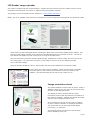
Close down any other Net2 applications, including the Net2 server, to avoid any USB program conflicts. Run
the LCD reader image uploader and it will detect the USB Net2Air device connected to the PC. The PC will
then detect and display any LCD units that are in range of the USB device.
They are listed along with their Net2Air signal strength. Highlight the required reader and select one of the
four image types. You can browse the PC for a new image or restore one of the defaults provided.
(see Customised images)
Once the image is displayed, click on 'Send image' and this will be uploaded to the selected reader.
If more than one reader requires updating, a batch send function is available.
Select the option in the functions menu and then select the readers to be
updated. The selected image will be sent to each reader in turn.
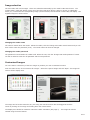
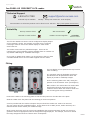
Image orientation check
The metal backplate is marked with an arrow. Select a
'Rotation' option to turn the green arrow into the same
direction as the backplate arrow.
This display is used to confirm that any image
transmitted to the reader will match the orientation of
the reader as installed. Rotating this display does NOT
alter the actual image that will be sent.
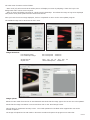
In the example on the left, we have set the rotation
to show a reader installed in a landscape orientation.
This shows that the current image would display
incorrectly. (i.e. sideways)
The image should be corrected and viewed again
before uploading to the unit.
PAGE 3