1
English
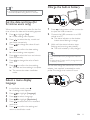
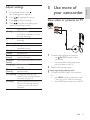
Charge the built-in battery
Tip
• To save energy, the camcorder turns off
automatically after being idle for 3 minutes.
Set the date and time (for
first-time users only)
When you turn on the camcorder for the first
time, a menu for date and time setting appears.
1
Press
at the bottom of the camcorder
to eject the USB connector.
1
Press to highlight [Yes].
» A date setting menu appears.
2
2
Press / to select the day, month and
year fields successively.
Connect the USB connector to a USB
socket on a PC.
» The status indicator on the shutter
button starts flashing in orange.
3
Press
field.
3
4
Press
to confirm the date setting.
» A time setting menu appears.
Wait until the status indicator stops
flashing and turns to green steadily.
» The built-in battery is fully charged.
5
Press / to select the hour and minute
fields successively.
6
Press / to change the value of each
field.
7
Press
to confirm the time setting.
» The date and time setting is complete.
/
to change the value of each
» The camcorder enters viewfinder
mode.
Tip
• The camcorder is fully charged for first-time
use.
• It takes about 3 hours to fully charge the builtin battery via the PC.
You can also charge the camcorder via a USB
adaptor (not supplied) connected to mains
power. The charge time is about 2 hours.
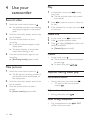
Select a menu display
language
1
In viewfinder mode, press .
» A settings menu appears.
2
3
4
5
Press
6
/
to highlight [Language].
Press / to select a language.
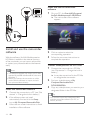
Press
/
to highlight [Resolution].
Press / to select the HD or standard
resolution.
Press
to confirm the setting and
return to viewfinder mode.
EN
11