1
Troubleshooting
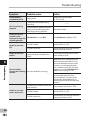
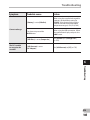
Symptom
Probable cause
Action
Cannot find the
recorded Voice File
Wrong folder.
Switch to the correct folder
(☞ P.27 to P.30).
The recorder was shaken during
recording.
Noise heard during
playback
Unable to hear any
sound from the
earphone through the
recording monitor
Unable to erase the
file
Unable to erase the
folders
The recorder was placed near a cell
phone or fluorescent lamp while
recording or during playback.
Move the recorder.
[Rec Monitor] is set to [Off].
Set [Rec Monitor] to [On] (☞ P.59).
The file is locked.
Unlock the file (☞ P.53).
The file is read-only.
Unlock the file or cancel the read-only
setting of the file on the PC.
There is a file which cannot be
recognized by the recorder in the
folder.
Connect the recorder to your PC and
erase a folder (☞ P.90).
6
Troubleshooting
Noise is audible
through the recording
monitor
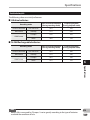
Unable to set index
marks, temp marks
EN
104
———
Acoustic feedback is occurring.
When the built-in speaker amps and
the like are connected there is a risk
that audio feedback will occur while
recording. It is recommended that
you use earphones for the recording
monitor, or turn the [Rec Monitor] to
[Off] while recording (☞ P.59).
Perform adjustments, such as further
distancing the earphones from
the microphones, not pointing the
microphones at the earphones, or
lowering the volume of the recording
monitor.
The maximum number of marks has
been reached.
Erase unnecessary marks (☞ P.45).
The file is locked.
Unlock the file (☞ P.53).
The file is read-only.
Unlock the file or cancel the read-only
setting of the file on the PC.