1
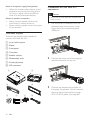
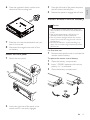
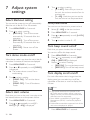
Place the supplied rubber cushion over
the end of the mounting bolt.
3
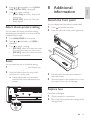
Press the left side of the panel and point
the left hole at the left pillar.
4
Release the panel to engage the left side.
Install remote control battery
Caution
• Risk of explosion! Keep batteries away from
7
Slide the unit into the dashboard until you
hear a click sound.
8
Reconnect the negative terminal of the
car battery.
Attach the front panel
1
2
Attach the trim plate.
heat, sunshine or fire. Never discard batteries
in fire.
• Risk of decreased battery life! Never mix
different brands or types of batteries.
• Risk of product damage! When the remote
control is not used for long periods, remove
the batteries.
• Perchlorate Material - special handling may
apply. See www.dtsc.ca.gov/hazardouswaste/
perchlorate.
For first-time use:
1
Remove the protective tab to activate the
remote control battery.
To replace the remote control battery:
1
2
Open the battery compartment.
3
Close the battery compartment.
Insert 1 CR2025 batteries with correct
polarity (+/-) as indicated.
Insert the right side of the panel in the
chassis until it is correctly engaged.
EN
13
English
6