1
SMART CAT5 SWITCH – 108/116
Table of Contents
1. Welcome ................................................................................................................................ 4
2. Introduction........................................................................................................................... 5
2.1 Features............................................................................................................................................. 5
2.2 System components ......................................................................................................................... 5
2.3 Compatibility ..................................................................................................................................... 6
2.4 The Smart CAT5 system configuration............................................................................................ 6
2.5 The Smart CAT5 models................................................................................................................... 7
2.6 Pre-installation guidelines................................................................................................................ 7
3. Connecting the Smart CAT5 system ................................................................................... 8
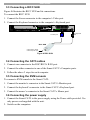
3.1 Connecting a ROC/RICC PS/2 .......................................................................................................... 8
3.2 Connecting a ROC/RICC USB .......................................................................................................... 9
3.3 Connecting a RICC SUN ................................................................................................................. 10
3.4 Connecting the CAT5 cables.......................................................................................................... 10
3.5 Connecting the KVM console ......................................................................................................... 10
3.6 Connecting the power supply ........................................................................................................ 10
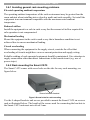
3.6.1 Avoiding general rack mounting problems ................................................................................... 11
3.6.2 Rack mounting the Smart CAT5................................................................................................... 11
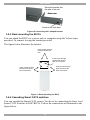
3.6.3 Rack mounting the RICCs ........................................................................................................... 12
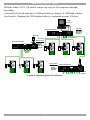
3.6.4 Cascading Smart CAT5 switches................................................................................................. 12
4. Operating the Smart CAT5 system.....................................................................................14
4.1 The keyboard hotkeys .................................................................................................................... 14
4.2 Displaying the OSD......................................................................................................................... 14
4.2.1 Navigating the OSD ..................................................................................................................... 15
4.2.2 Selecting a computer ................................................................................................................... 15
4.2.3 The OSD settings (F2) ................................................................................................................. 15
4.2.4 The General settings ................................................................................................................... 16
4.2.4.1 Security .................................................................................................................................. 16
4.2.4.2 Administrator (Status A) ......................................................................................................... 17
4.2.4.3 Supervisor (Status S) ............................................................................................................. 17
4.2.4.4 User (Status U) ...................................................................................................................... 17
4.2.4.5 Activating password protection ............................................................................................... 17
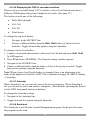
4.2.4.6 Displaying the OSD of cascaded switches.............................................................................. 18
4.2.4.7 Autoskip ................................................................................................................................. 18
4.2.4.8 Serial port............................................................................................................................... 18
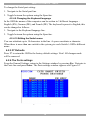
4.2.4.9 Changing the Keyboard language .......................................................................................... 19
4.2.4.10 Editing the Switch name ....................................................................................................... 19
4.2.5 F7 Defaults .................................................................................................................................. 19
4.2.6 The Ports settings........................................................................................................................ 19
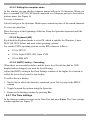
4.2.6.1 Editing the computer name..................................................................................................... 20
4.2.6.2 Keyboard (KB)........................................................................................................................ 20
4.2.6.3 (HKEY) hotkey - Cascading.................................................................................................... 20
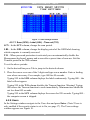
4.2.7 The Time settings ........................................................................................................................ 20
4.2.7.1 Scan (SCN) - Label (LBL) - Time out (T/O)............................................................................. 21
4.2.8 Users........................................................................................................................................... 21
1