1
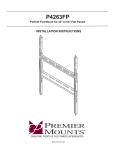
P4263TP
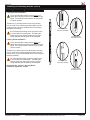
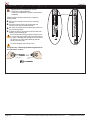
Lock-It™ Security Barrel Installation (Optional)
Optional security configurations include:
- PCB-CSL1 (sold separately)
- Padlock (Combination or Keyed; commercially
available)
Mounting Tab
Please read the following directions to install the
security barrel:
the locking screw from the mounting
➊➊ Remove
bracket.
the locking screw into and through the
➋➋ Place
security barrel (see illustration below).
the locking screw and security barrel into
➌➌ Re-insert
the mounting bracket.
the locking screw and security barrel until
➍➍ Tighten
seated in the mounting tab.
Do not thread the locking screw any further once
it is even with the mounting tab (see illustration to
the right). Threading the locking screw any further
will prevent you from safely attaching the flat
panel to the wall plate.
Do not overtighten the locking screw.
Proceed to the “Attaching the Mounting Bracket to
the Flat Panel” section.
Locking Screw
Page 14
Lock-It™ Security
Barrel
Visit the Premier Mounts website at http://www.premiermounts.com
Installation Instructions