1
SS3GR1028F Series Installation Guide
Chapter 1 Introduction
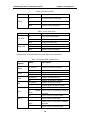
Table 1-2 Port LEDs
LED
Red
Status
Description
On
On means ports are in the link state
of 100M or export PoE power
Off
Off means ports are not in the link
state of 100M or do not export PoE
power
Blink
Send or receive the data
On
On means ports are in the link state
of 1000M
Green
Off
Off means ports are not in the link
state of 1000M
Blink
Send or receive the data
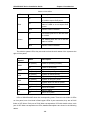
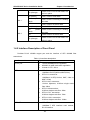
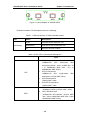
The other is system LEDs, they are used to show the work status of the system at the
right of front panel.
Panel
Symbol
PWR
DIAG
ALM
RPS
M1
M2
Status
Description
On (Green)
Power is operating normally
Off
Power is abnormally
On (Green, blink)
System is loading
On (Green)
System is operating normally
On (Green)
System is malfunctioning
Off
On (Green)
System is operating normally
Off
System does not use DC power
On (Green)
M1 is in place
Off
M1 is not in place
On (Green)
M2 is in place
Off
M2 is not in place
System is using DC power
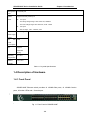
LEDs of SS3GR1028F show the corresponding state. There are two kinds of LEDs
on front panel, one of its kinds is fiber/copper LEDs of port transceiver, they are at RJ45
linker or SFP linker. Each port of RJ45 linker corresponds a LED with double colors, each
port of SFP linker corresponds two LEDs, detailed descriptions are shown in the following
tables.
1-5