1
Before you start!
Introduction
Thank you for purchasing the Arcam AV9 Preamp processor.
The AV9 is a high-quality and high-performance home-cinema processor and audio pre-amplifier
built to Arcam’s quality design and manufacturing standards. It combines digital processing with high
performance audio and video components to bring you an unrivalled home-entertainment centre.
The AV9 allows switching and volume control of eight analogue and seven digital sources making it an
ideal companion for both home cinema and two-channel stereo systems. Since many of these source
components are also capable of putting video signals out, the AV9 includes broadcast-quality video
switching for composite-, S-video-, component-, RGB- and HDMI-video signals. There are inputs and
outputs for both tape and VCR, as well as a digital output; DVD-Audio and SACD can be connected via
the multichannel input. Control of the AV9 is either by front panel control buttons, IR remote control or
an RS232 port (which can also be used to upload future software enhancements).
The AV9 can be integrated with various types of power amplifiers and loudspeakers, including those
that are THX certified. The AV9 is itself THX certified, meaning it has passed the rigorous THX Ultra2
specification enabling it to reproduce THX Surround EX signals from Dolby Digital soundtracks.
The installation of the AV9 in a listening room is an important process which requires care at every
stage. For this reason, the installation information is very comprehensive and should be followed
carefully.
Using this handbook
This handbook has been designed to give you all the information you need to install, connect, set-up and
use the Arcam AV9. The remote control handset supplied with the equipment is also described.
It may be that the AV9 has been installed and set-up as part of your Hi-Fi installation by a qualified
Arcam dealer. In this case, you may wish to skip the sections of this handbook dealing with installation
and setting up the unit, and move directly to the sections dealing with using the player. Use the contents
list on page 3 to guide you to these sections.
Safety
Safety guidelines are set out on page 2 of this handbook. Many of these items are common sense
precautions, but for your own safety, and to ensure that you do not damage the unit, we recommend
that you read them.
This is a class 1 product and requires an earth connection.
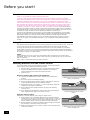
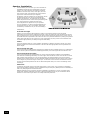
Inserting batteries into the remote control
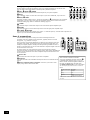
The remote control requires two ‘AA’ batteries to operate. To insert the batteries
into the remote control, please follow these instructions:
1.
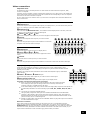
Open the battery compartment cover on the back of the remote control.
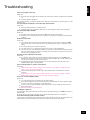
2.
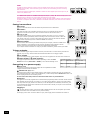
Insert two AA batteries into the battery compartment, following the
polarity indications given inside the compartment itself.
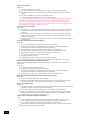
3.
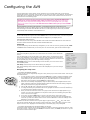
Close the cover.
�
�
Notes on inserting the remote control batteries
<
Incorrect use of batteries can result in hazards such as leakage and
bursting.
<
<
Do not mix old and new batteries together.
1. Opening the cover of the remote control
battery compartment.
Do not use different kinds of battery together—although they may look
similar, different batteries may have different voltages.
<
Ensure that the plus (+) and minus (—) ends of each battery match the
indications in the battery compartment.
<
Remove batteries from equipment that is not going to be used for a
month or more.
<
When disposing of used batteries, please comply with governmental (or
other) regulations that apply in your country or area.
2. Inserting batteries into the remote
control.
Using the remote control
�
Please keep in mind the following when using the remote control:
AV9
E-4
<
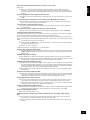
Ensure that there are no obstacles between the remote control and the
remote sensor on the AV9. The remote has a range of about 7 metres. (If
the remote sensor is obscured, the remote control input jack on the rear
panel is available. Please contact your dealer for further information.)
<
Remote operation may become unreliable if strong sunlight or fluorescent
light is shining on the remote sensor of the AV9.
<
Replace the batteries when you notice a reduction in the operating range
of the remote control.
�
3. Closing the cover of the remote control
battery compartment.