1
Record Mode
Play your digital voice recording files or record
sounds from external audio sources.
Voice Playing Controls
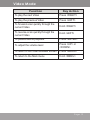
The following functions may be performed from the
Voice Playing screen.
Function
Key Action
To play the next track
Press <RIGHT>
To play the previous track
Press <LEFT>
To forward-scan quickly through the
current track
Hold <RIGHT>
To reverse-scan quickly through the
current track
Hold <LEFT>
To pause/resume playback
Press <ENTER>
To access the Quick Option menu
(see below for details)
Press <OPTION>
To adjust the volume level
Press <UP> or
<DOWN>
To return to the Main menu
Hold <MENU>
Quick Option Menu
To access the quick option menu, press and hold
<ENTER> on the Voice Playing screen.
Page 26