1
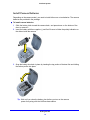
VueZone System Install Camera Batteries Depending on the camera model, you need to install either one or two batteries. The camera batteries are provided in the package. To install camera batteries: 1 Slide the battery latch toward the camera back, and press down on the bottom of the door to remove it. 2 Insert the battery with then negative (-) end first. Be sure to follow the polarity indication on the sticker inside the camera. 3 Snap the battery door back in place by inserting the top portion of the door first and clicking the bottom portion into place. Tip: Wait until you close the battery door before you turn on the camera power for syncing with the VueZone base station. Getting Started 10