1
Connecting Speakers
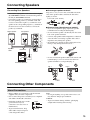
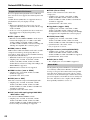
Connecting Your Speakers
• Connect the right speaker to the CD receiver’s right
(R) SPEAKERS terminals. Connect the left speaker to
the left (L) SPEAKERS terminals.
• Connect the positive (+) terminal on each speaker to
the corresponding positive (+) terminal on the CD
receiver. Connect the negative (–) terminal on each
speaker to the corresponding negative (–) terminal on
the CD receiver. Use the red wires to connect the
positive (+) terminals.
Right speaker
Speaker
cable
Left speaker
■ Screw-type speaker terminals
Strip 1/2" to 5/8" (12 to 15 mm) of insulation from the
ends of the speaker cables, and twist the bare wires
tightly, as shown.
1/2" to 5/8" (12 to 15 mm)
■ Banana Plugs (North American models)
• If you are using banana plugs, tighten the speaker
terminal before inserting the banana plug.
• Do not insert the speaker code directly into the center
hole of the speaker terminal.
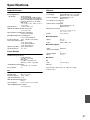
• Connect only speakers with an impedance of between
4 and 16 ohms. Connecting a speaker with a lower
impedance may damage the speaker.
• Be careful not to short the positive and negative wires.
Doing so may damage the CD receiver.
Red wires
LINE INPUT
• Do not connect both speaker cables to the same L or R
terminals (Fig. 1). Do not connect more than two
speaker terminals to each speaker (Fig. 2).
LINE INPUT
Powered subwoofer
Fig. 1
Fig. 2
Connecting Other Components
About Connections
• Before making any connections, read the manuals
supplied with your other components.
• Don’t connect the power cord until you’ve completed
and double-checked all connections.
• Push plugs in all the way to make
good connections (loose
connections can cause noise or
malfunctions).
• To prevent interference, keep
audio cables away from power
cords and speaker cables.
Right!
Note:
• Do not put anything on top of the CD receiver, as it
may interfere with proper ventilation.
Caution:
• To prevent shutter damage, hold the optical plug
straight when inserting and removing.
Wrong!
15