1
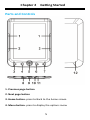
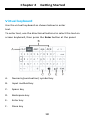
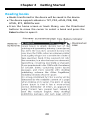
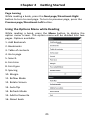
Chapter 2 Getting Started Book library From Main menu, select Library to open the book library. In the book library, select a book to start reading it. Use the Directional-up/down button to scroll through the book list. Press the Page up/down button to turn pages if there are more books than fit on one screen. From the Options menu, select View by to change view mode(List/Thumbnail mode). This device supports TXT, PDF, ePUB, PDB, FB2, HTML, RTF formats. Adobe DRM content can be opened for PDF and ePub files. Sorting the book list In the book library, books can be sorted by author, title, recently read, newly added, favourite etc.. Press the Menu button, then select Sort by to choose a sorting method. Select the desired book to start reading. Search for books in the library Use the search feature to search for your desired books in the library. In the Options menu, select Search to display a search bar and the keyboard. Type the book name by using the directional buttons and Enter button at the panel, then press the Enter Button on the keyboard to confirm. Note: After typing the book name, you can also press the Keyboard button to hide the virtual keyboard, and then press the Enter button to start the search. 19