1
Installation
Adjusting the Projected Image
Adjusting the Projector’s Height
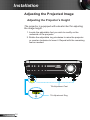
The projector is equipped with elevator feet for adjusting
the image height.
1.Locate the adjustable foot you wish to modify on the
underside of the projector.
2. Rotate the adjustable ring clockwise to raise the projector
or counter clockwise to lower it. Repeat with the remaining
feet as needed.
Tilt-Adjustment Feet
Tilt-Adjustment Ring
English
14