1
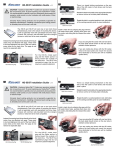
Remove the protective
tape from the bottom
of the chipset cooler.
Through the original
mounting holes, insert
both plastic mounting
screws from the back
of the video card.
To help keep them secure, place rubber washers on
the plastic screws above the board.
If required, use the bracket extension tabs to reach
the chipset’s mounting holes. The extensions are
highly-adjustable for proper alignment.
Use the metal attachment nuts to fasten the
mounting bracket to the video card chipset.
Hand-tighten all video card components.
36
Installing Coolers