1
PAIRING YOUR ZAGGkeys MINI 7
The Bluetooth® keyboard should only need to pair to
your iPad once as follows:
1. On the iPad select: Settings > General > Bluetooth > On.
2. P r e s s t h e p a i r b u t t o n o n t h e k e y b o a r d . T h e L E D
status light will flash blue until the device is paired.
3. The iPad will display “ZAGGkeys MINI 7” as an available
device. Select this option to complete pairing.
CHARGING
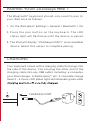
Your keyboard comes with a charging cable that plugs into
the side of the device. You can plug the other end of the
charging cable into any USB outlet, including: a computer,
your iPad charger, A ZAGGsparq™, etc. A complete charge
takes 2 - 4 hours. LED status light will illuminate green while
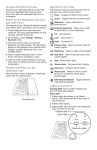
CHARGING PORT