1
Section 3 - Configuration
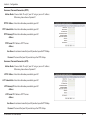
Dynamic IP (DHCP)
This section will help you to obtain IP address information
automatically from your ISP. Use this option if your ISP didn’t
provide you with IP address information and/or a username and
password.
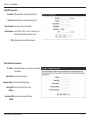
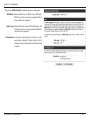
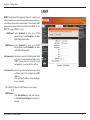
Host Name: (Optional) Required by some ISPs.
Primary DNS (Optional) Fill in with IP address of primary
Server: DNS server.
Secondary DNS (Optional) Fill in with IP address of secondary
Server: DNS server.
MTU (Maximum You may need to change the Maximum
Transmission Transmission Unit (MTU) for optimal
Unit): performance. The default value is 1500.
MAC Address: The default MAC address is set to the Internet
port’s physical interface MAC address on the
broadband router. It is not recommended that
you change the default MAC address unless
required by your ISP. You can use the Clone
button to replace the Internet port’s MAC
address with the MAC address of your PC.
Auto-reconnect: This feature enables this product to renew
WAN IP address automatically when the lease
time is expiring.
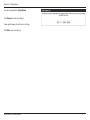
Click Save Settings to save your changes,
or click Don’t Save Settings to discard your
changes.
D-Link DWR-116 User Manual
17