1
Removing the Display Hinge...........................................................................................................23
Installing the Display Hinge............................................................................................................ 24
Removing the Palmrest...................................................................................................................24
Installing the Palmrest.................................................................................................................... 26
Removing the Display Assembly.....................................................................................................26
Installing the Display Assembly.......................................................................................................28
Removing the ExpressCard Cage................................................................................................... 28
Installing the ExpressCard Cage..................................................................................................... 29
Removing the System Fan...............................................................................................................29
Installing the System Fan................................................................................................................ 30
Removing the System Board........................................................................................................... 31
Installing the System Board............................................................................................................ 33
Removing the Heatsink...................................................................................................................34
Installing the Heatsink.....................................................................................................................34
Removing the I/O Board (Left)........................................................................................................35
Installing the I/O Board (Left)......................................................................................................... 36
Removing the I/O Board (Right)..................................................................................................... 36
Installing the I/O Board (Right)....................................................................................................... 37
Removing the Power Connector.................................................................................................... 37
Installing the Power Connector......................................................................................................38
Removing the Speakers.................................................................................................................. 38
Installing the Speakers.................................................................................................................... 39
Removing the Status-Light Board.................................................................................................. 40
Installing the Status-Light Board....................................................................................................40
3 System Setup........................................................................................................ 43
Boot Sequence................................................................................................................................43
Navigation Keys...............................................................................................................................43
System Setup Options.....................................................................................................................44
Updating the BIOS ..........................................................................................................................54
System and Setup Password........................................................................................................... 54
Assigning a System Password and Setup Password................................................................. 54
Deleting or Changing an Existing System and/or Setup Password.......................................... 55
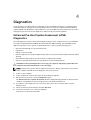
4 Diagnostics............................................................................................................57
Enhanced Pre-Boot System Assessment (ePSA) Diagnostics.........................................................57
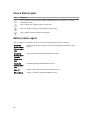
Device Status Lights........................................................................................................................ 58
Battery Status Lights....................................................................................................................... 58
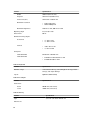
5 Specifications....................................................................................................... 59
6 Contacting Dell.................................................................................................... 65