1
Advanced Operation
Video recording, capture mode
After power-on, the camera automatically enters video recording mode. In video
recording mode at HI size, click MODE key to switch the size to Lo; in video
recording mode at Lo size, click MODE key to enter capture mode at HI size, and
in capture mode at Lo size, click MODE key to return to video recording mode at
HI size.
In video recording mode, press Shutter key to start recording and press it again to
stop recording, press MODE key to switch to Lo size. In capture mode, press
Shutter key to start shooting, and press MODE key to switch to Lo size.
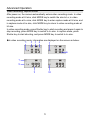
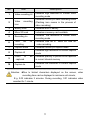
◆ In video recording mode, information are displayed on the screen as below:
1
2
3 4
5
6
7
8
9
10
8